Widgets
By clicking here, the user will see different widget menus sorted by categories.
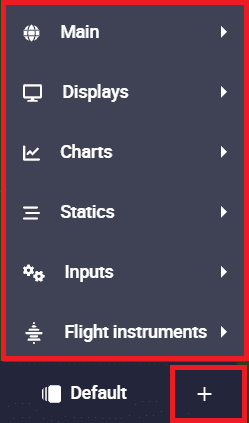
To display any widget on the map, just search for the desired widget and configure it.
Warning
If the variable configured for a widget is not present in the telemetry configuration of the PDI, the widget will appear with a red triangle (warning icon), indicating that the selected variable is not being received in Veronte Ops.

Widgets common configuration
Warning
This does not apply to widgets in the 'Statics' category.
All widget editing menus except those in the 'Statics' category have at least the following configurable parameters:
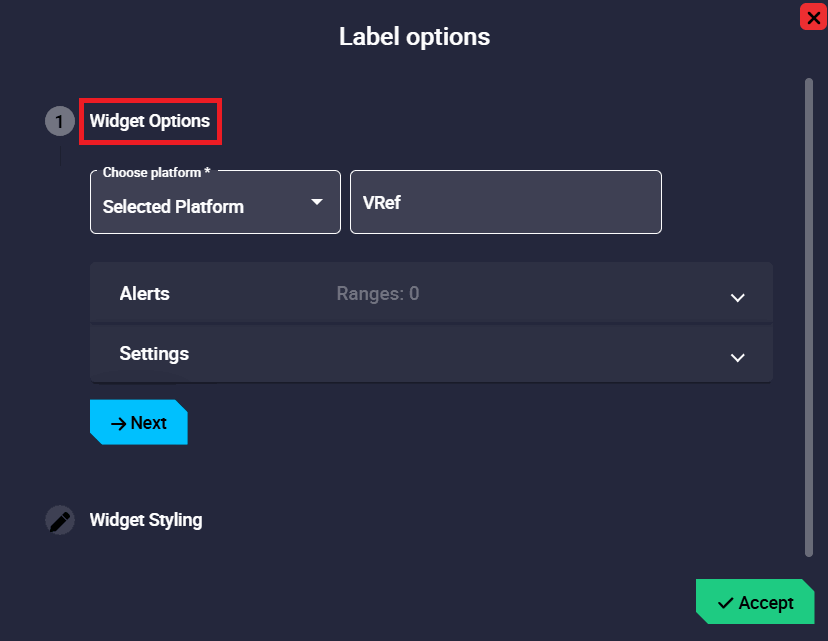
- Choose platform: Users must select the platform for which the widget is configured. The available options will always be the IDs of the connected Autopilots 1x and 'Selected platform', i.e. the platform that is selected.
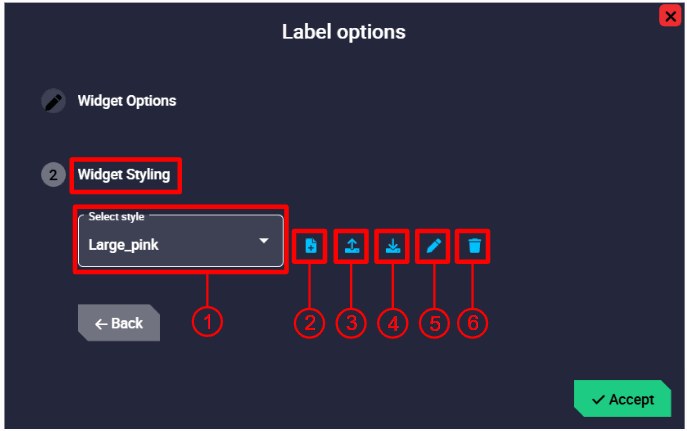
Here the user can choose the style of the widget:
-
Select style: Default and custom styles can be selected. The available default styles are Default_box, Default_box_transparent, Default_box_blur, Default_box_black, Default_pill and Default_pill_blur.
Note
Not all these default styles are available in all widgets.
-
Add new style:A new style can be created from the currently selected style by clicking here.
- Import style: Users can import a custom style from local storage. It must be a
.cssfile. -
Export style: By clicking here, the selected custom style will be exported in a zip folder. More information about the contents of this folder is described in the Style manager - Veronte Ops configuration section of this manual.
Important
This option is only available when a custom style is selected.
-
Edit style: Users can directly edit the configuration (code in
.cssformat) of the selected style by clicking here.Important
This option is only available when a custom style is selected.
-
Remove style: The selected style will be deleted.
Important
This option is only available when a custom style is selected.
All widgets are explained in detail in the following sections:
© 2026 Embention. All rights reserved.