Veronte products
This section explains how to integrate NEX-FD with Veronte products.
1. Autopilot 1x
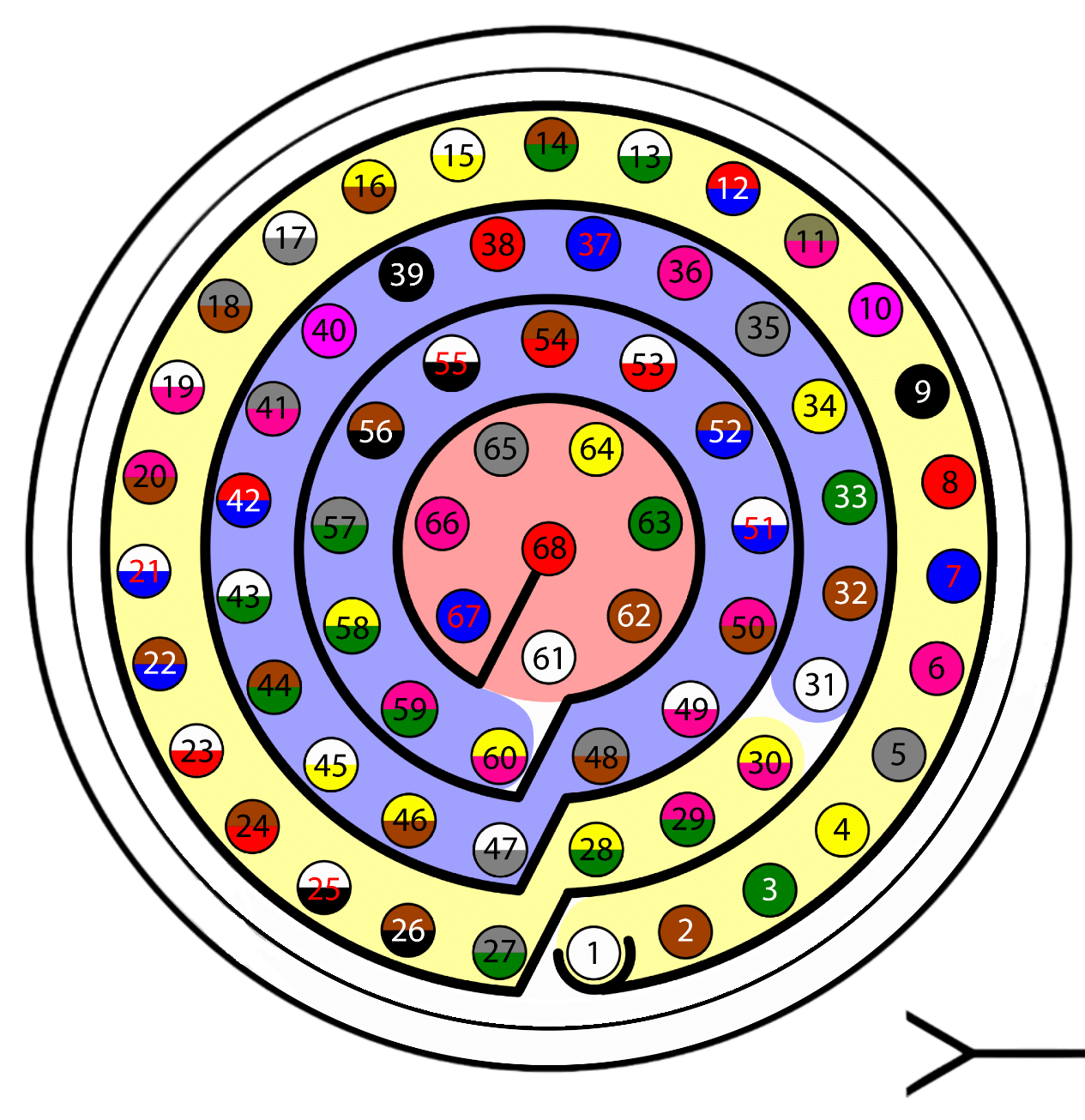
When communication is established between the PC and the NEX-FD using the Veronte Autopilot 1x as a tunnel, the connection between the NEX-FD and Autopilot 1x is via CAN.
The pin connection between the two devices should be like this:
| Autopilot 1x connector | NEX-FD connector | ||||
|---|---|---|---|---|---|
| PIN | Signal | Color code | PIN | Signal | |
| 25 / 28 | CANA_P / CANB_P | White-Black / Yellow-Green | 1 | CAN_H | |
| 26 / 29 | CANA_N / CANB_N | Brown-Black / Pink-Green | 2 | CAN_L | |
| 30 | GND | Yellow-Pink | 3 | GND | |
Note
Either CAN A or CAN B must be selected to connect the Autopilot 1x to the CAN bus of the NEX-FD.
Warning
Reminder: In Autopilot 1x, all GND pins are common. Note that pin 54 is not a common GND pin.
© 2026 Embention. All rights reserved.