Software Installation
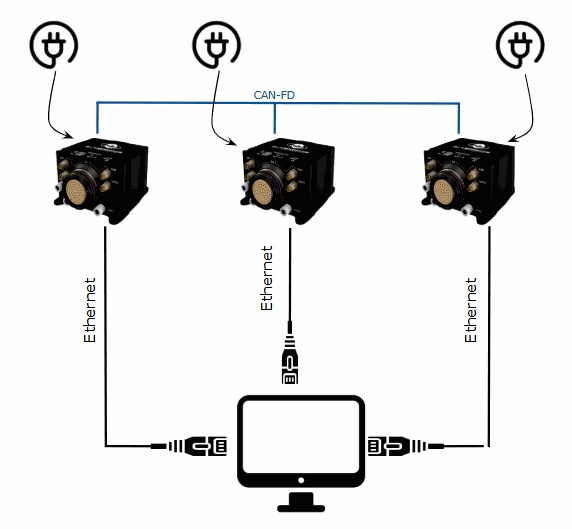
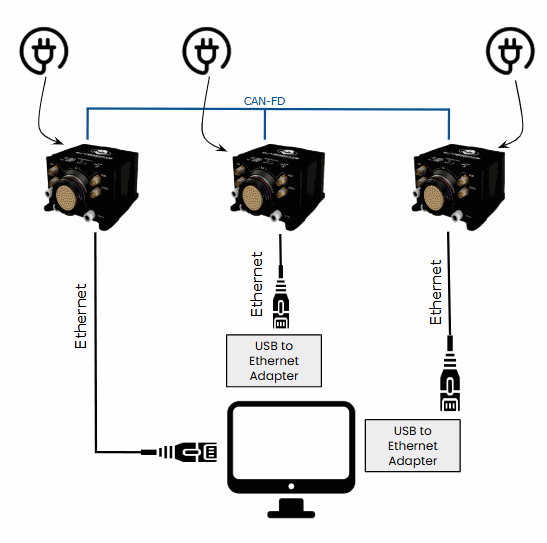
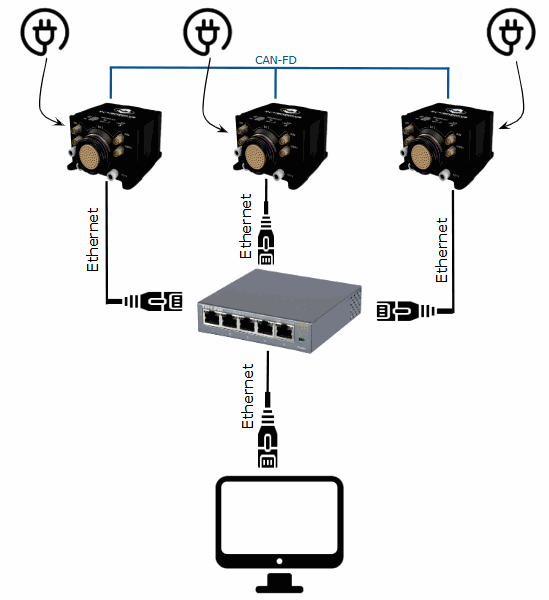
To configure the DRx system, the three 1x units must be connected to a computer. This connection can be established via Ethernet in two ways: by connecting the three autopilots directly to the computer, or by using an Ethernet switch.
In both scenarios, a proper Ethernet configuration must be set up on the computer. To enable the Ethernet connection between the autopilots and the computer, users must strictly follow the the steps described in the Ethernet connection - Software Installation section of the 1x Hardware Manual.
Direct Connection
The following diagram illustrates how to connect a computer to the DRx system for configuration.
If the computer lacks three Ethernet ports, USB-to-Ethernet adapters can be used.
Ethernet Switch Connection
The following diagram illustrates how to connect the DRx to a computer using an Ethernet switch.
How to configure DRx
To install the required software and configure each Veronte Autopilot 1x, please proceed to the 1x Software Manual.
© 2026 Embention. All rights reserved.