Hardware Installation
For technical specifications, please refer to the Hardware Installation section of the 1x Hardware Manual.
CAN-FD Wiring Connection
To establish communication across the DRx system, the three Autopilot 1x units must be interconnected via the CAN-FD A bus line existing in the Autopilots 1x. For detailed pinout specifications of the CAN-FD, please consult the Pinout - Hardware Installation section of the 1x Hardware Manual.
A standard CAN-FD bus requires exactly two 120 Ω termination resistors, located strictly at the physical extremities of the communication line. Each Autopilot 1x features an integrated 120 Ω resistor that can be enabled or disabled via software configuration (complete integration description in the DRx Integration Example section of the 1x PDI Builder user manual). This provides the flexibility to implement three different installation topologies:
- Internal Termination: Enable the internal resistors only on the two units positioned at the physical ends of the bus.
- External Termination: If necessary, disable the internal resistors on all three autopilots and install external 120 Ω resistors at the absolute ends of the aircraft wiring harness.
- Mixed Termination: If one autopilot sits at the physical end of the bus but the network extends past the other units to external peripherals, enable the internal resistor only on the extremity autopilot and place an external 120 Ω resistor at the absolute far end of the vehicle's network.
Note
Internal Termination is strongly recommended if the CAN-FD bus is dedicated exclusively to the internal DRx autopilot units, meaning no other external devices are connected to the network.
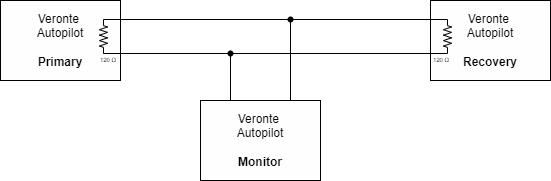
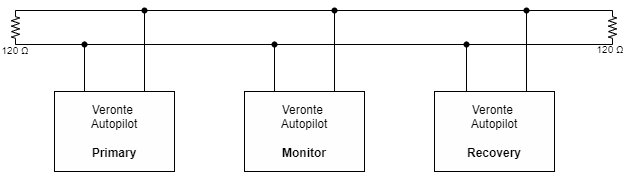
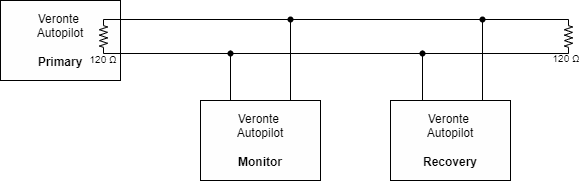
Further instructions on how to interconnect multiple autopilots via CAN are detailed in the CAN Wiring Connection - Integration Examples section of the 1x Hardware Manual.
© 2026 Embention. All rights reserved.